A year ago I shared Three Ways to Master Hashtags and as with all things social media, the rules are continuously changing. I wanted to bring back one of my favorite Hashtag Hacks of all time and modernize it one year later!
By now it isn’t a secret that I love Instagram. Yes, there are days when I nearly delete the application from my phone because I struggle with the ongoing reality of Comparison in the creative workplace… but for the most part, it’s my favorite social media platform! The key with Instagram, as with anything else, is to find ways to be as efficient and effective as possible so that you can get back to living in the real world!

I hope this little Hashtag Hack helps to give you a few seconds of your day back! Remember that a strategy is only as good as the thought and heart behind it. Be intentional with your use of hashtags and do your research when it comes to investing your time and resources into any marketing plan!
I used to keep lists of hashtags in the Notes application, but had to scroll through searching for the right note and then copying the long list of hashtags with each post. Now, I simply type a few letters and BOOM the hashtags appear. Easy as pie! This comes in handy when you’re using the same hashtags repeatedly for your branded professional work or travel!
To Setup Shortcuts on an iPhone:
Settings >> General >> Keyboard >> Shortcuts
Then click the (+) Symbol to Add a New Shortcut
The Phrase will be your list of hashtags and The Shortcut is the smaller phrase you’ll write to insert them!
Hashtags offer creatives the opportunity to create client communities, establish online portfolios, and reach new audiences without paying a dollar for advertising! For small businesses, this free access to your target market is truly extraordinary if used correctly!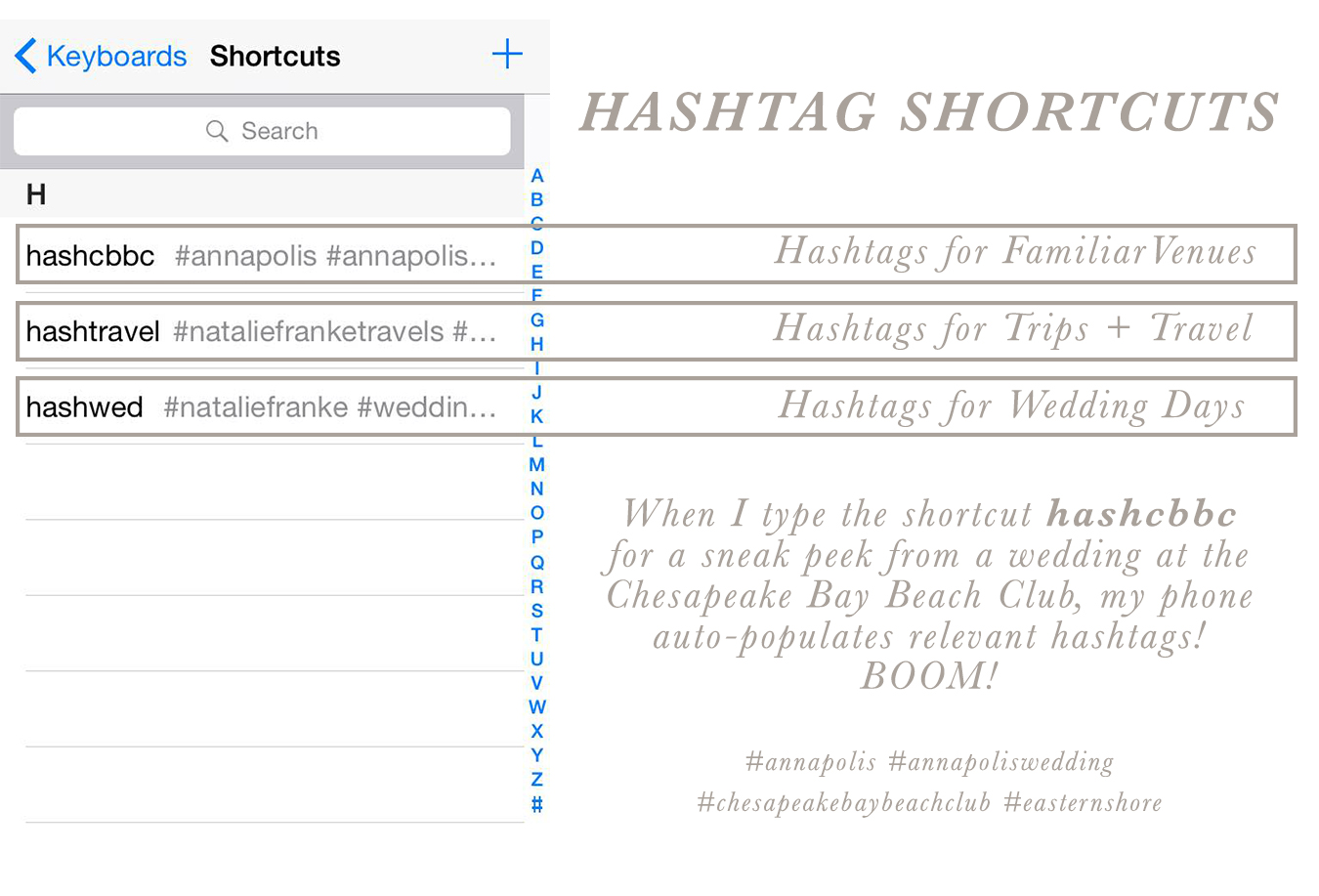
So you’re probably wondering: Where do I find these hashtags? How do I know which ones to use?
To be honest, it’s an ongoing act of researching your target audience, thinking like your clients, and putting your images where they are going to be searching. I always recommend starting with locational hashtags (#annapolis, #marylandwedding) and working your way into more specific aesthetic ones (#nauticalwedding). I have a few running lists of hashtags that I use for different types of posts that I regularly share and it simplifies my life to have a shortcut ready to use whenever I’m marketing my business.
And what about those dots? I keep seeing you use the five dots in a row!
If you’ve noticed that many Instagram lovers have started incorporating five individually spaced dots into the beginning of their hashtag list, then you are onto the latest hack! In order to turn a long obnoxious list of hyperlink blue hashtags into a simple condensed triple dot […] you can use this little trick.
Minimizing Hashtags:
1) In the Notes Section of your phone, type five individual periods separated onto different lines.
2) Paste these five dots into the first comment after you post your image.
3) Then use the shortcuts above to quickly insert your hashtags.
When you publish the comment and return to the main feed, you’ll notice that your list of hashtags has been replaced with three simple little dots. Voila! I love this trick because it allows me to minimize the obnoxious list of hashtags that allow me to target my marketing efforts and keeps my audience focussed on what truly matters… the photograph being shared and the heart behind the caption!
May 3rd, 2016 at 9:43 am
This is such an awesome tip!!! Holy crap, totally implementing this now. Thank you!
May 3rd, 2016 at 9:49 am
Just what I needed! Thank you Natalie!!!
May 3rd, 2016 at 9:52 am
This is such a great tip!! I am going to do this right now! Thanks, Natalie!
May 3rd, 2016 at 10:55 am
Great tips, Natalie!
May 3rd, 2016 at 11:16 am
Great information! I’m about to use it right now! As always thanks for sharing and being such a positive force in the community!
May 3rd, 2016 at 12:42 pm
I’ve racked my brain trying to figure out the three little dot trick, AHH!! Thank you so much for explaining this!! And what a GREAT idea for creating keyboard shortcuts to house the ever-evolving list of hashtags! You’re a peach! 🙂 🙂 🙂
May 4th, 2016 at 1:44 am
You’re a genius! I was reading a post from somewhere about shortcuts to typing out e-mail addresses frequently by using @@ but I would never think about using shortcuts for hashtags!
Thanks for sharing
May 4th, 2016 at 9:51 am
This is amazing information! I’m not the best at hash tagging (or at Instagram!) so this is going to help me SO much! Thanks!
May 4th, 2016 at 9:53 am
This is awesome! Thanks so much for sharing!
May 4th, 2016 at 9:54 am
Thanks for the great advice! I will definitely be setting up the hashtag shortcuts!
May 4th, 2016 at 9:54 am
Such great info! Thanks for sharing!
May 4th, 2016 at 10:02 am
Love this tips, Natalie!
May 4th, 2016 at 10:18 am
OMG YES! Thank you for this!
May 4th, 2016 at 10:19 am
This is great! I keep a list of my hashtags in a “memo” on my phone and just copy, paste and edit it 🙂 I wonder if androids have this shortcut it may be easier!
May 4th, 2016 at 10:21 am
Great Tip! Will definitely have to try it on my Samsung Galaxy!
May 4th, 2016 at 12:31 pm
Awesome timesaving tip!! #natalieforthewin
May 4th, 2016 at 1:16 pm
Genius!!!
May 4th, 2016 at 3:35 pm
Is there a way to do this on Samsung Galaxy?
May 4th, 2016 at 6:15 pm
Life just got simpler! Thank you!
May 4th, 2016 at 10:46 pm
Why are you so brilliant?!?
May 11th, 2016 at 10:32 am
I really need to start posting on Instagram more. This is a great tip!
May 11th, 2016 at 10:32 am
I’m going to do this right now! Thanks for sharing this!
May 11th, 2016 at 10:32 am
This is rad! Thank you!
May 11th, 2016 at 10:39 am
Thank you! Very helpful tips!
May 11th, 2016 at 10:52 am
Thanks for sharing!
May 11th, 2016 at 10:55 am
I’ve tried this on my new phone and for some reason it doesn’t work! Boo! I have a prepared list of hashtags in the ‘Notes’ app and just copy & paste from there
May 11th, 2016 at 12:00 pm
This is SUCH a great tip! Thank you so so much for sharing! Will make my life so much easier!
May 11th, 2016 at 4:11 pm
Love this! Thanks for the hacks 🙂
May 11th, 2016 at 9:41 pm
Thanks for the great tip! I will get a lot of use out of this!
September 13th, 2016 at 2:12 am
Great idea, I haven’t thought of this one!
October 2nd, 2016 at 10:54 pm
THIS IS PERFECT! Why didn’t I think of this?! <3 THANK YOU!