





After speaking last week at the Creative at Heart Conference on one of my favorite topics, Social Media, I went in depth about how I strategically use hashtags to connect with my audience and build a following. Hashtags are an amazing way to categorize and label your images in order to be searchable on platforms like Instagram! Using hashtags allows you to connect with other users who are searching for or engaging with particular categories of content.
Today, I’m going to discuss Three Ways to Maximize the Power of Hashtags and if you’d like to know more about how I use Instagram for Business – I will be sending out my Art of Instagram Guide to my Newsletter Community tonight! The guide will go more in depth on how I utilize this platform professionally and I hope it helps as you continue to build your own following!
 Introduction to Hashtags
Lets start at the beginning and answer the fundamental question – What is a hashtag?
Definition of Hashtag (Digital Technology | Noun): A word or phrase preceded by a hash mark (#), used within a message to identify a keyword or topic of interest and facilitate a search for it. >> According to Oxford Dictionaries
They are often used to categorize, distinguish, and sometimes even indicate irony! In the realm of entrepreneurship, hashtags play a critical role in connecting users with content and communities that matter to them. They enable users to find your content organically and to connect your brand with larger trends, goals, and movements!
Three Tips to Master Hashtags
1) Be Strategic With The Placement of Hashtags
I recommend being intentional about the location of where you’re placing your hashtags and how many you choose to use! Whenever there is a hashtag that I want my audience to see, I place it in the Image Caption right below my introductory text. I call this hashtag my “Overt Hashtag” because it will always remain visible above the latest likes and comments that follow. Hashtags placed in the Image Caption are often relevant to current conversation or direct my audience to my online portfolio (in the case below)!
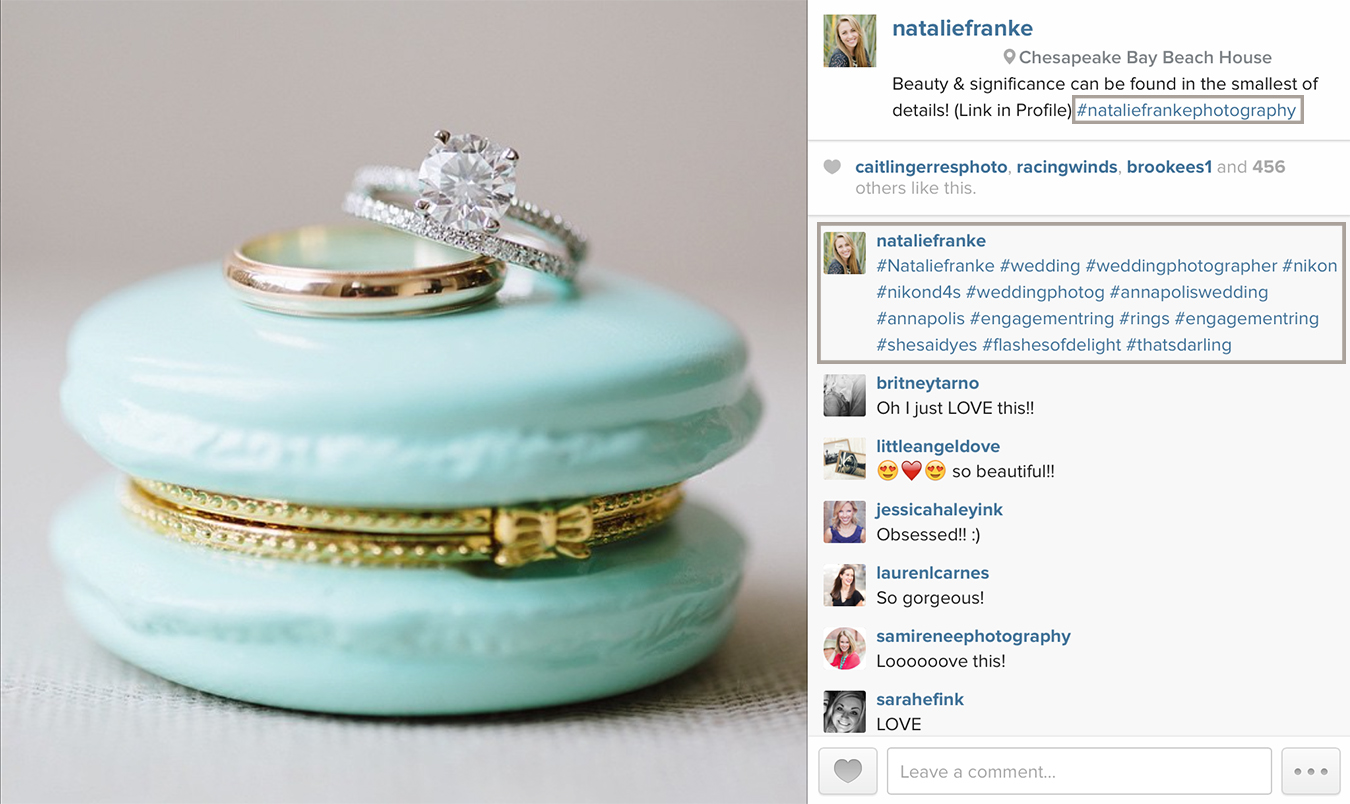
For Strategic Categorical and Searchable Hashtags or “Covert Hashtags” as I refer to them, I post these hashtags directly into the first comment below my caption. Why, you may be wondering? When comments follow in the minutes and hours after posting, Instagram hides the original comments and only shows the three to four most recent posts on any particular image. This means that once subsequent comments are posted on that image, the long list of hashtags you shared in the first comment disappears discretely! This reduces the obnoxious list of hashtags that can so easily become an eye-sore in a beautifully curated feed!
2) Use Hashtags to Create an Instagram Portfolio
I recommend creating your own unique hashtag for your business as a means of linking all of your creative work or business-related images! I use the hashtag #nataliefrankephotography and #nataliefranke whenever posting my professional images!
Clients, Friends, and Colleagues will catch on and also begin using your hashtags to share your behind the scenes moments, welcome packets, client gifts, and more throughout the year! Once someone clicks on the hashtag, they are immediately introduced to your brand and professional images immediately right on Instagram!
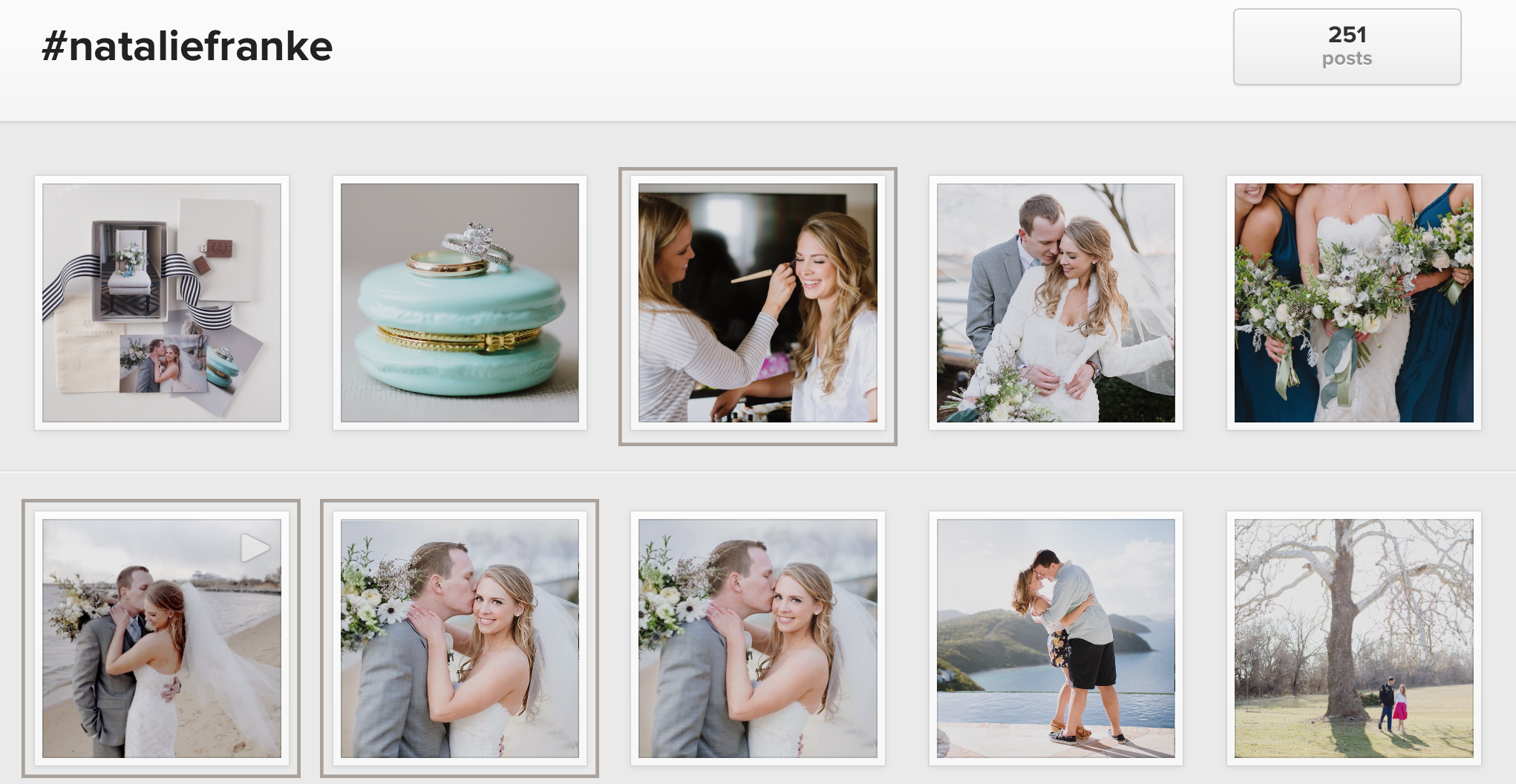
The set of  images above contain my branded hashtag #nataliefranke — Indicated Images with the khaki framing were actually posted by other vendors using my hashtag too! One is a video from the amazing cinematographer who captured Madeline & Tyson’s Wedding while the others are from the Makeup and Hair Stylist Respectively! How cool is that?Â
One of my favorite coastal brands, Sperry Topsiders, initiated the hashtag #topsiding which is used whenever someone photographs a picture of themselves doing something fun in their favorite pair of boat shoes! Their audience has caught on and now boasts the hashtag to describe not only the product, but also the coastal lifestyle that their fans enjoy!
Hashtags not only categorize and connect, but also work to create a community of users around your brand and business. Whether it’s a pair of shoes or a wedding photographer – hashtags offer a unique avenue to reach new customers, unite loyal ones, and build your business!
3) Add Commonly Used Hashtags as Shortcuts on your Phone
This one may be a game changer for many of you and I’m so grateful for my friends Shannon + Brad for sharing this tip with me! Rather than typing out long lists of hashtags every time you post a new Instagram, you can create Shortcuts in your phone that auto-paste your list of hashtags instantly!
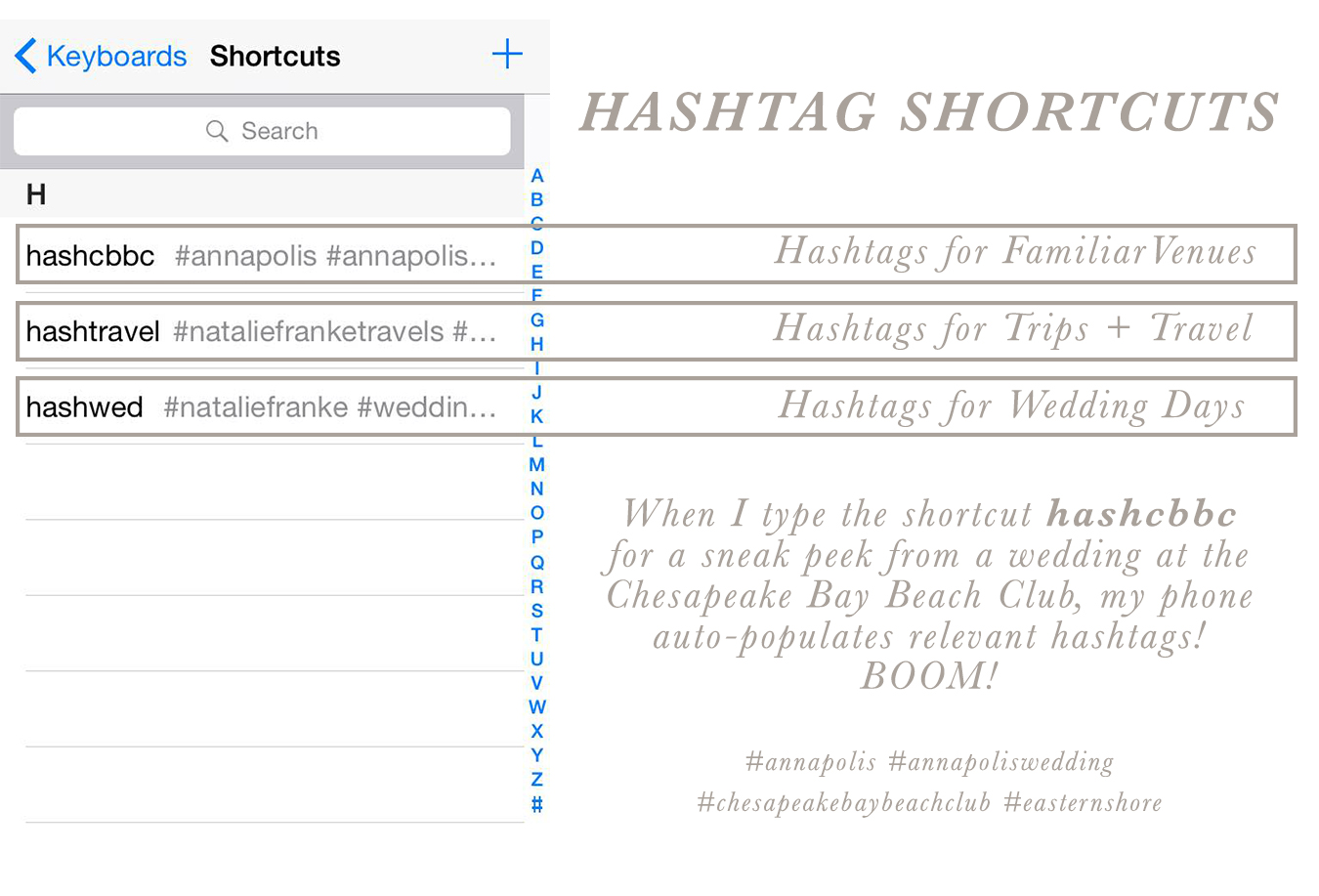 For example, I consistently use the same hashtags whenever I photograph a wedding at the Chesapeake Bay Beach Club and rather than retyping these hashtags out with each upcoming event – I created a shortcut. Whenever I type, hashcbbc in my phone, the shortcut automatically inserts my list of associated hashtags directly into the post!
I used to keep lists of hashtags in the Notes application, but had to scroll through searching for the right note and then copying the long list of hashtags with each post. Now, I simply type a few letters and BOOM the hashtags appear. Easy as pie! This comes in handy when you’re using the same hashtags repeatedly for your branded professional work or travel!
To Setup Shortcuts on an iPhone:
Settings >> General >> Keyboard >> Shortcuts
Then click the (+) Symbol to Add a New Shortcut
The Phrase will be your list of hashtags and The Shortcut is the smaller phrase you’ll write to insert them!
Hashtags offer Entrepreneurs the opportunity to create client communities, establish online portfolios, and reach new audiences without paying a dollar for advertising! For small businesses, this free access to your target market is truly extraordinary if used correctly!
I’m so excited to share my Instagram Guide with the Newsletter Community tonight with additional tips for Utilizing my favorite Social Media Platform!
If you aren’t already a part of the club, be sure to Sign Up!












Natalie you are our photopedia 😉 hihi Thank you for your helpful informations. Have an amazing day.
This is all so helpful! I didn’t even know about the shortcuts for the iPhone!! So big thanks for this post. <3
OMG those shortcuts are brilliant!!
The hashtag shortcut tip is blowing my mind right now!! Thanks for sharing all your knowledge!
i can’t wait to implement that shortcuts tip!!!!
yay- you are the hastag guru!!!
Love this post Nat! Your social media skills are unparalleled 🙂
Love the tip on using hashtags to create a portfolio! Learned that from you at the conference and I started one for myself! Thanks for the great content 🙂
This is such a helpful post!
AH The shortcuts!!! THANK YOU! XO
This is great, thank you for sharing Natalie:)!! I also think tagging vendors/clients in images and sharing their handles on Instagram is a great way to connect and share the love:)!
You are a genius! I just stumbled upon your blog and I feel incredibly inspired. This was so helpful and it has made me want to use Instagram even more than I do now (which is probably already too much, haha). Thank you for sharing! Hope you have a wonderful day.
http://simply-mode.com
Very helpful tips! Thanks, Natalie!!
HOLY CRAP! Shortcuts is TOTALLY going to be a game changer! THANK YOU!!!
This is amazing!!! I had no idea!!! SO grateful for you, and you sharing all of your knowledge with us!! 🙂
The shortcuts!!!! Thank you!!
LOVE that short cut! Never knew this! Definitely a game changer! Thanks for sharing! 🙂
Oh my gosh! Why didn’t I ever think of number 3!!!! That is brilliant! Thank you for sharing Natalie! xoxo!
Love these tips!
This is great info! Thank you for sharing!! I did exactly what you said step by step, but my lovely phone won’t add the #’s in =(.. What am I doing wrong?
Nikki – Make sure that your Phrase is the list of hashtags and the Shortcut itself is a single word! I mix them up sometimes and that could be your problem!
AHHH girl you rock! I used to have preset hashtag sets in evernote but shortcuts will rock my world!!! THANKS!
Super helpful!
That keyboard shortcut tip is a GAME CHANGER! Thanks for all the helpful advice! 🙂
So helpful!! Especially the shortcuts!! Thank you for sharing Natalie!
Thank you for this wealth of info!
Great post. I might be the only photographer on the planet who hasn’t been utilizing Instagram for my business. It’s one of those things I need to change. Thank you for the advice!
Hi Natalie!
Do you ever book people that have found you via Instagram?
YES! Actually, I believe I have two or three brides this year that found me through Instagram!
Thank you for these awesome tips and helpful hints. You’re pretty fantastic. #winningwithNatalieFranke
Such helpful tips, thanks for sharing!
http://www.mintnotion.com
I didn’t even know there were shortcuts! Awesome, thanks for sharing!
You. are. brilliant.
Love the tips! Thank you!!
this is quite helpful!
Thank you, Natalie! This is very helpful!I’m going to start using these tips with my instagrams, especially the one about adding hashtags to the comment area; VERY helpful!
Genius tip on the iPhone shortcut, thank you!!
That’s so helpful thank you for sharing!
[…] Instagram can be incredibly effective even with a small audience. Hashtags increase your reach significantly and are just as effective whether you have a small following or a large one! Tips for Mastering Hashtags >> […]
[…] read Natalie’s other hashtag tips here […]
[…] year ago I shared Three Ways to Master Hashtags and as with all things social media, the rules are continuously changing. I wanted to bring back […]
How do you insert full stops on instagram? I can’t seem to figure out the 5 full stops concept.
Never mind! I found your latest post with that information. Cheers!